0x20Writing
Reversing Akira's Rust Experiment: A Breakdown, Part 1
A breakdown and commentary on Check Point Research's analysis of Akira ransomware's Rust rewrite.
Originally published on RE: Exploit (Medium). Read the original ↗
This post is a breakdown and commentary on Ben Herzog’s Check Point Research (December 2024), Inside Akira Ransomware’s Rust Experiment & his talk in 2025. All technical claims are grounded in the linked primary sources below. Combined with Cindy Xiao’s amazing reports/talks in 2024, 2025 (about reconstructing types and more).
The technique of recovering the rustc compiler version from embedded
/rustc//strings and recovering third-party crates from
registry/src/index.crates.io-…/- / panic paths was
independently developed by Juan Andrés Guerrero-Saade and Nicole Fishbein
in their Proj-0xA11c toolset, presented at Recon 2024:
https://github.com/juanandresgs/Proj-0xA11c
There will be a part 2 to break down the rest. I separate them so this article won’t be _too_long_.
For this analysis, Binary Ninja (v5.3.9434) is used without enabling any plugins. Binary: akirav2.elf , SHA25:60ee1d284ed663073872012c7bde7fac5ca1121403f1a5d2d5411317df282796c.
A note on source references
The commit hash is updated on 10th Jun 2026. 79e9716c… is rustc 1.74.0 stable (released 2023-11-16). Akirav2’s .rodata contains std panic-path strings of the form /rustc/
/library/... .db034cee… is a master/nightly commit from ~1 year later, which I was mistakenly pinned in the article. If you see any links related to db034cee… , please consider it was based on previosu wrong assumption but it works to some degree.
The Rust standard library is under active development and files move between releases. Source links in this post are pinned to commit 79e9716c980570bfd1f666e3b16ac583f0168962 — rustc 1.74.0 stable, the toolchain that compiled this Akira v2 binary. This is recoverable directly from the binary: its .rodata embeds /rustc/79e9716c…/library/... panic paths, and it is corroborated by version-pinned FunctionID analysis resolving the sample to 1.74.0.
This matters because stdlib code is inlined directly into the final binary at compile time: what you see in the disassembly reflects the stdlib at that specific commit, not the current main branch. Following a newer version of the same file risks misidentifying inlined boilerplate or drawing incorrect conclusions about what the malware authors wrote versus what the compiler contributed.
If a pinned link returns a 404, the file has likely been relocated. Navigate to the repository root and search by filename.
Table of Contents
- Background
- Summary for Part 1
- VM Setup for malware analysis
- Binja plugins for Rust binary
- Is this a Rust binary?
- (Updated) It’s a release build
- .rodata strings are extraordinarily revealing
- The Control Flow Map
- Section 1: How args().collect() Works
- Further Reading
- References
Background
In early 2024, Akira ransomware-as-a-service operators circulated a new variant, internally called “Akira v2”, written in Rust and aimed specifically at ESXi bare-metal hypervisor servers. Cisco Talos first documented the variant in their ongoing Akira evolution tracking.
Check Point Research published a detailed assembly-level analysis in December 2024. Unlike most ransomware reports that answer only targeted questions (“what encryption is used?”, “what extensions are targeted?”).
Talos documented Akira v2 from a March 2024 incident response engagement, where they observed the Rust ESXi variant deployed alongside a Windows encryptor called Megazord. The v2 sample they analysed is version 2024.1.30 and uses rust-crypto 0.2.36 for encryption, replacing the Crypto++ library used in the original C++ variant. Here rust-crypto supplies the SOSEMANUK symmetric stream cipher (not ChaCha20 or AES); the asymmetric key wrapping is X25519 via curve25519-dalek 4.1.1. See the Part 3 correction note for the full pipeline.
Summary for Part 1
Because this article and following ones in the series will be fairly_long, so I put the summary before the in-depth breakdown.
Layer 1: Crate/Dependency Recovery via .rodata Panic Strings
Every entry here was recovered purely from static string analysis, no execution, no DWARF.
Recovery mechanism: Cargo embeds full filesystem paths into panic messages at compile time. Format is always:
/mnt/c/Users/user/.cargo/registry/src/index.crates.io-6f17d22bba15001f/<crate-name>-<version>/src/<file>.rs
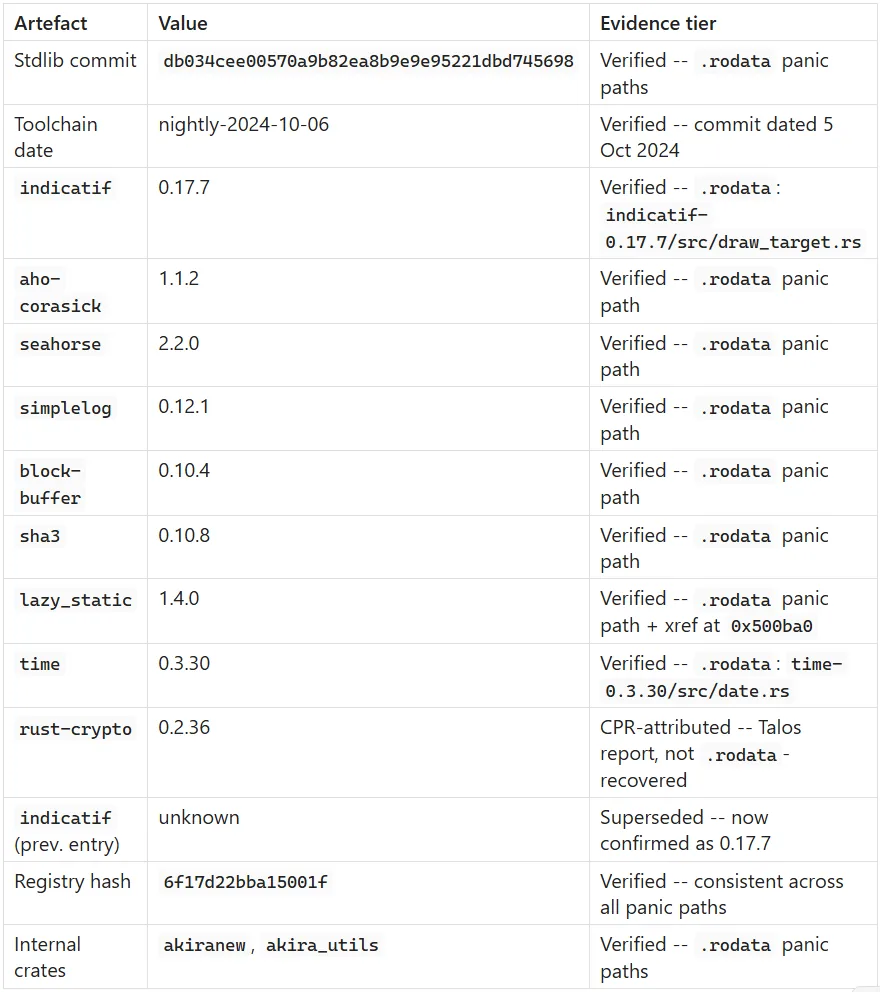

In conclusion, Indicatif version is 0.17.7.
Updated 17 May 2026: I’m still writing the analysis part 2 at the moment, Indicatif version has actually found but I was drown in the piles of strings, so accidentally ignored it.
Internal workspace crates (not on crates.io, custom):

Developer platform also recoverable: WSL on Windows, username user, consistent registry hash 6f17d22bba15001f across all paths confirming single build environment.
Struct names leaked via aho-corasick SIMD backends (panic strings referencing internal type names):
- SlimSSSE3 : 128-bit SSSE3 Teddy searcher
- SlimAVX2: slim 256-bit AVX2 variant
- FatAVX2 : fat 256-bit AVX2 Teddy searcher
These tell you the SIMD capability branch taken at runtime even without executing.
Layer 2: Internal Module Map (recovered from panic strings + format literals)
akiranew/
├── src/
│   ├── main.rs        — CLI parsing, fork/stopvm, interactive prompt
│   ├── lock.rs        — encryption logic (akira_v2::lock namespace confirmed)
│   ├── path_finder.rs — filesystem enumeration (akira_v2::path_finder confirmed)
│   └── prng.rs        — custom PRNG
└── Cargo.toml
    (workspace member: akira_utils)
Top-level call chain confirmed: main → default_action → lock → lock_closure
Layer 3: Type Layout Recovery via args().collect() Unwrapping Chain
This is another type-unwrapping chain showing how a single source call maps to assembly. The document traces five layers:
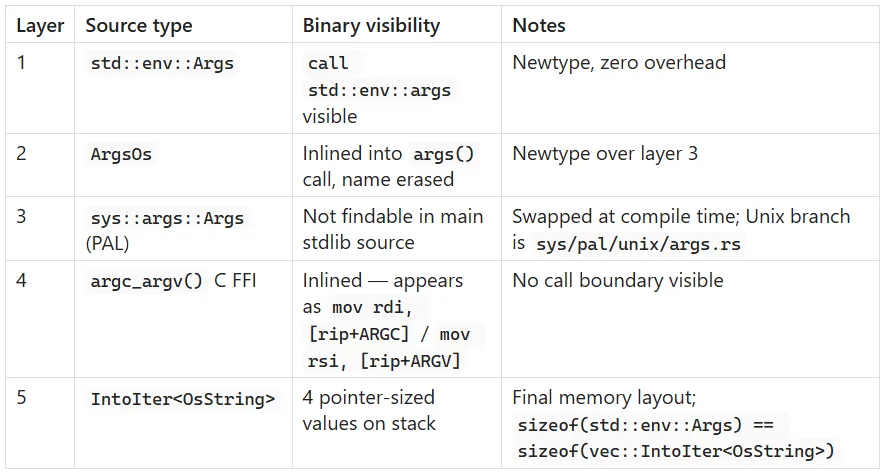
IntoIter
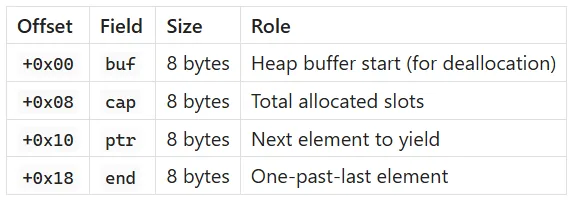
phantom (PhantomData) and alloc (Global) are ZSTs: zero bytes in binary.
OsString on Linux (24 bytes, stride value for heap iteration):
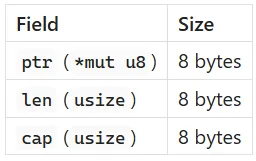
RE implication directly stated in document: the confusing pointer arithmetic in the binary is stride-8 (reading argv[]) then stride-24 (OsString iteration). Knowing those two values makes the assembly readable.
Linux vs Windows OsString stride difference (relevant if you ever need cross-platform comparison in the paper):
- Linux: OsString = Vec
internally = 24 bytes - Windows: OsString = Wtf8Buf = 32 bytes (ptr, len, cap, is_known_utf8 bool padded to 8 bytes)
What‘s still uncertain for Part 1
- rust-crypto 0.2.36 comes from the Talos report reference, not from .rodata recovery in this document.
- indicatif version is not discovered (in Part 1), only confirmed by format strings, not a panic path.
- Source links in this post are pinned to commit 79e9716c980570bfd1f666e3b16ac583f0168962 — rustc 1.74.0 stable, the toolchain that compiled this Akira v2 binary. This is recoverable directly from the binary: its .rodata embeds /rustc/79e9716c…/library/... panic paths, and it is corroborated by version-pinned FunctionID analysis resolving the sample to 1.74.0 (Updated on 10th Jun 2026).
- unicode-width version is unconfirmed (the path is truncated to unicode-wi...
There will be more to be discovered in Part 2…
VM setup for malware analysis
To ensure this is an air-gapped VM (Windows 10)
Step 1: VM network adapter (most important)
In whatever hypervisor you are using:
VMware Workstation/Player:
- VM Settings > Network Adapter > set to “Host-only” first, then ideally “No network connection” (disconnect entirely)
- Tick “Connected” checkbox OFF
VirtualBox:
- Settings > Network > Adapter 1 > untick “Enable Network Adapter” entirely
- Do this for all adapters (check Adapter 2, 3, 4 tabs too)
Hyper-V:
- VM Settings > Network Adapter > set to “Not Connected”
Step 2: Disable network inside the guest OS
Even with the adapter disconnected at hypervisor level, do this inside the VM as defence in depth:
# In PowerShell as Administrator
Disable-NetAdapter -Name "*" -Confirm:$false
Or via GUI: Device Manager > Network Adapters > right-click each > Disable.
Step 3: Shared folders and clipboard
These are your biggest risk vectors for accidental data movement:
VMware: VM Settings > Options > Shared Folders > Disabled; Guest Isolation > untick both clipboard and drag-and-drop
VirtualBox: Devices > Shared Folders > remove all; Devices > Shared Clipboard > Disabled; Devices > Drag and Drop > Disabled
Step 4: Snapshot before touching the sample
Take a clean snapshot now, before the sample is on the VM, labelled something like clean-pre-analysis. This is your recovery point if anything goes wrong.
# VMware CLI alternative
vmrun snapshot "path/to/vm.vmx" "clean-pre-analysis"
Step 5: Transfer the sample safely
Since shared folders should be off, transfer via:
- ISO mounting: package the sample into an ISO on the host, mount it read-only in the VM. The sample cannot write back through a mounted ISO.
- Password-protected zip (password: infected is the malware research convention) mounted or copied in, then extracted inside the VM only.
Do not re-enable shared folders or clipboard to transfer the file.
Step 6: Strip execute permissions immediately on arrival
Once inside the VM, in PowerShell:
# Confirm it is an ELF, not a PE - it should not execute on Windows anyway
# but strip any accidental execute association
$file = "akira_sample"
# Rename with a safe extension to prevent accidental double-click
Rename-Item $file "$file.bin"
Renaming to .bin prevents Windows from accidentally associating it with anything executable.
Verify your air-gap
Inside the VM after setup:
# Should show no active connections
Get-NetAdapter | Select Name, Status
ping 8.8.8.8  # Should time out with no response
If ping times out and adapters show as Disabled or Disconnected, you are properly isolated.
For the analysis involving debuggers/execution like dynamic analysis, you can also install inetSim. It’s recommended to check the book Practical Malware Analysis.
Find the sample
It’s encouraged to check out the CISCO Talos threat report and discover the details and the hashes.
Binja plugins for Rust binary & Some useful links
According to Cindy Xiao’s talk/report in 2024, when you discover some clues of Rust types, considering the links:
I would certainly recommend readers to enable those plugins before the binary analysis/REing (I didn’t enable them this time, and you can still work through it manually).
- Rust String Slicer (by Cindy Xiao)
- Rust Demangler (by inspier)
- Rust Type Layout Helper (by Cindy Xiao)
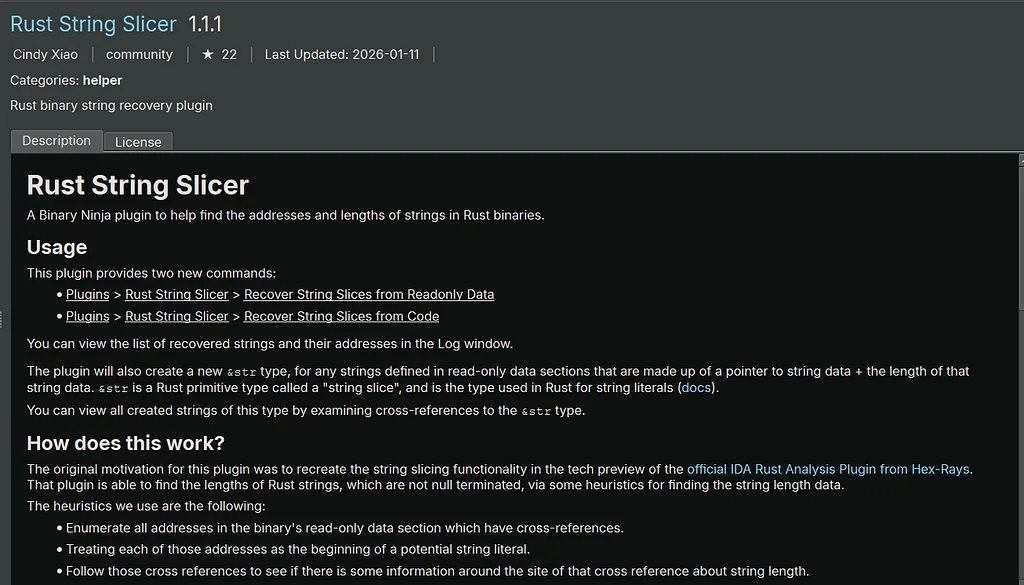
rust_string_slicer: the string problem
The core issue it solves is that Rust strings are not null-terminated. A &str is a fat pointer: a (pointer, length) pair. Binary Ninja's default string scanner looks for null terminators, so it systematically misses Rust string literals or truncates them at the first zero byte in the data. This means your strings view in a naive analysis of Akira v2 will be incomplete or misleading.
The plugin runs two heuristics:
Recover from readonly data: it scans .rodata for cross-referenced addresses and checks whether the cross-reference site has the pattern QWORD ptr_to_string_data followed immediately by QWORD length. This recovers string slice structs laid out statically in read-only data, which is where Rust places string literals used in static contexts.
Recover from code: it follows cross-references into code sections and looks for the idiom:
lea rax, <string_data_addr>
mov [rsp+var.ptr], rax
mov [rsp+var.len], <immediate_length>
The immediate value after the lea is the length the plugin extracts. This catches strings constructed on the stack at runtime, which the data-section heuristic cannot see.
Once recovered, the plugin defines a &str type in Binary Ninja's type system with fields char* address and int64_t length, then annotates every recovered instance. The practical payoff is that you get cross-references to the &str type, which means you can enumerate all recovered string literals and their usage sites in one pass. For Akira v2, this would surface file extension lists, ransom note content, C2 strings, and any additional developer path leaks that the naive string scanner missed.
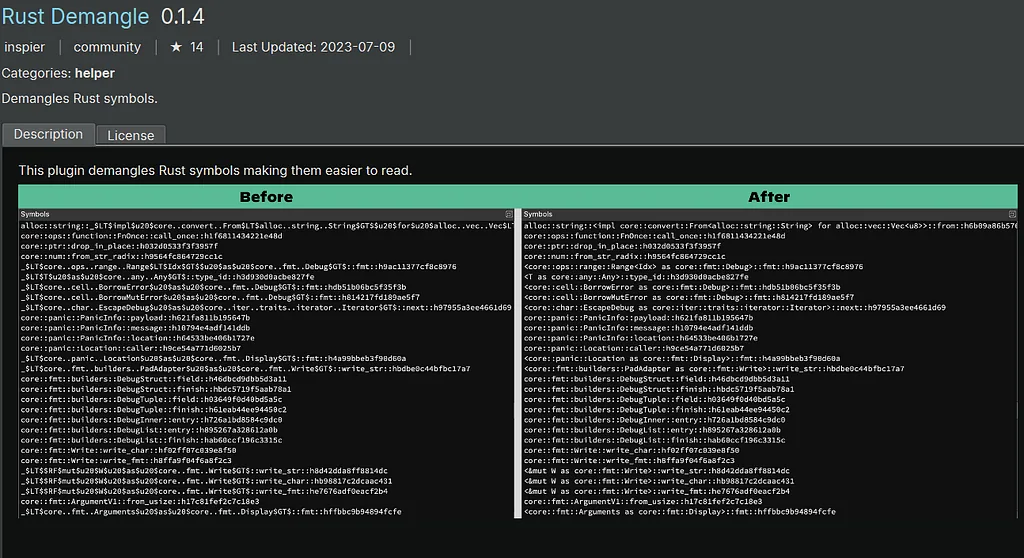
Rust symbol mangling: v0 scheme
Rust has had two mangling schemes. The legacy scheme was borrowed loosely from C++ Itanium ABI and was never formally specified. The v0 scheme was stabilised in Rust 1.37 (2019) and is now the default. It is designed to be unambiguous, fully encode Rust’s type system, and be demangleable without compiler knowledge.
Every v0 symbol begins with the prefix _R. After that, the symbol encodes a path followed optionally by a generic argument list and a disambiguator. The grammar is roughly:
_R <path> [<generic-args>] [<instantiating-crate>]
A concrete example:
_RNvCs6XXXXXXX_5akira8compress
Breaking this down:
- _R — v0 prefix
- N — indicates a nested path follows
- v — item type: function (v = value namespace)
- Cs6XXXXXXX_ — crate disambiguator (a hash derived from crate metadata, ensuring uniqueness across crates with the same name)
- 5akira — crate name, length-prefixed (5 characters: akira)
- 8compress — function name, length-prefixed (8 characters: compress)
For a method on a type, the path nests further:
_RNvNtCs..._5akira9Encryptor8run_pass
Where Nt indicates a type namespace and the path encodes akira::Encryptor::run_pass.
Generic instantiations
Monomorphised generics encode their type arguments inline. For example, a function fn process
Crate disambiguator
The hash component (Cs6XXXXXXX_) is derived from the crate's metadata hash at compile time. This means two builds of the same crate with different dependencies or compiler flags will produce different disambiguators. It is not useful for version fingerprinting directly, but it does mean you can cluster functions by crate of origin even in a mixed binary, since all functions from the same crate share the same disambiguator hash.
Why enabling the Rust demangler in Binary Ninja matters
Without demangling, every Rust symbol in the function list appears as raw _RNvCs... garbage. With demangling enabled, Binary Ninja resolves these to human-readable akira::Encryptor::run_pass style names, which gives you several concrete advantages in your workflow:
- Crate boundary recovery: the demangled name includes the crate component, so you can immediately see which functions belong to akira, which belong to akira_utils, and which belong to std or third-party dependencies. This is directly relevant to your akira_utils finding: if any symbols survived stripping, demangling would confirm the crate attribution rather than requiring you to infer it from panic strings alone.
- Type information from generics: monomorphised function names encode their concrete type arguments. alloc::vec::Vec
::push tells you the vector element type. This is information you would otherwise have to recover through data flow analysis. - Call graph legibility: Binary Ninja’s call graph and cross-reference views become significantly more readable. Instead of a graph of hashes, you see a graph of akira::encrypt::* functions calling into akira_utils::*, which immediately surfaces the module structure the developer intended.
Caveat for stripped binaries
For a fully stripped release build like Akira v2, most symbols are gone and the demangler has nothing to work with for internal functions. However it still applies to: any exported symbols (ELF binaries sometimes retain a small export table), any symbols recovered by Binary Ninja’s analysis heuristics, and any strings in .rodata that happen to contain mangled names (uncommon but not impossible). The demangler costs nothing to enable and pays off immediately if any symbols surface during analysis.
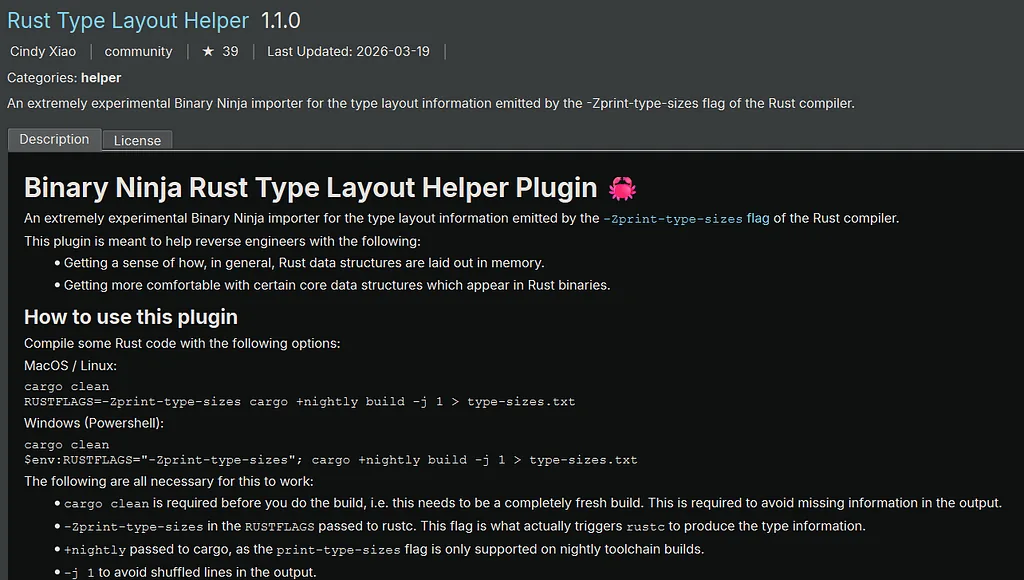
rust_type_layout_helper_bn: the type layout problem
This addresses a different but equally serious problem. Rust’s type system allows the compiler to reorder struct fields for optimal alignment, and enum discriminants use niche optimisation (for example, Option<Box
The plugin works by ingesting the output of rustc's -Zprint-type-sizes flag, which emits the exact field offsets, sizes, alignment padding, and enum variant layouts for every type in a compilation. The plugin parses that output and imports it directly into Binary Ninja's type library as proper struct and enum definitions, including padding bytes, packed variants, and discriminant fields.
The workflow requires you to compile a version of the target code (or a close proxy) with -Zprint-type-sizes on a nightly toolchain and redirect the output to a file, then load that file via the plugin. For malware analysis where you do not have source, you would compile the closest available open-source equivalent, or reconstruct a proxy crate that uses the same dependencies at the same versions, then import the resulting type layout.
The caveat the author flags is that layout is not stable across compilations: different compiler versions, different optimisation flags, or different target platforms can change field ordering and padding. So the imported types are a strong approximation, not a guarantee. For Akira v2, given that you have aho-corasick 1.1.2 and can narrow the rustc version window via the .rustc section, you could construct a fairly tight proxy.
Is this a Rust binary?
Rust binaries have a distinctive fingerprint across multiple analysis layers. The confidence of identification increases as more signals converge.
Panic infrastructure is the strongest single indicator. Every Rust binary compiled with std embeds panic handling machinery. Look for strings matching src/ paths with .rs extensions, often referencing crate names or Rust standard library internals. The string called Option::unwrap() on a None value or similar is essentially a Rust signature. Akira v2's TODO: panic message you found is directly in this family.
Crate name recovery from panic strings is your second tier. The panic formatting system preserves file paths at compile time. You can recover internal crate names, sometimes even dependency crate names (you found aho-corasick 1.1.2 this way), and frequently leaked workspace paths such as the WSL dev path in your Akira sample.
Symbol and section naming gives structural confirmation. Even in stripped release builds, section names like .rustc, rustc_debug_gdb_scripts_section (on ELF), or the presence of Rust-specific metadata embedded in the binary give it away. On Windows PE, look for .rdata strings referencing core::panicking or alloc::.
Monomorphisation artefacts are visible in the function count. Rust generics are monomorphised at compile time, so a Rust binary typically has an unusually large number of small, similar functions relative to its feature surface. This is measurable in Binary Ninja by comparing function count to code size.
Trait vtable layout is distinguishable from C++ vtables. Rust vtable entries for a trait object are: size, alignment, destructor pointer, then method pointers in trait-definition order. No RTTI string, no virtual inheritance complexity. C++ vtables typically have a RTTI pointer at offset -8.
Standard allocator fingerprint: Rust’s default global allocator calls through __rust_alloc, __rust_dealloc, __rust_realloc. These names survive in the import table or as internal symbols even after stripping.
Absence of C++ indicators is a useful negative signal: no _ZN Itanium mangled names, no type_info strings, no exception handling personality routine (__gxx_personality_v0).
(Updated 10 Jun 2026) It’s A Release Build
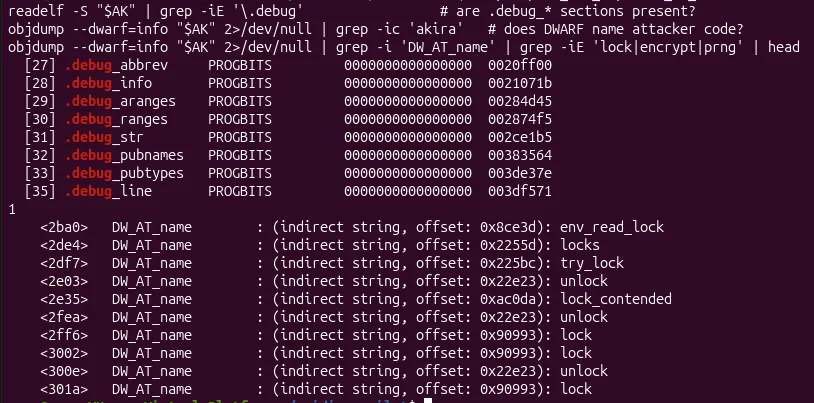
The std-DWARF leak is conditional on linking the backtrace machinery, which substantial std use pulls in.
Akirav2 is an optimised Release build: debug = 0, overflow-checks OFF. The .debug_* sections present are **leaked precompiled-**libstd DWARF; the attacker's own code and its application dependencies carry no DWARF. "Debug" is true only colloquially (DWARF sections exist); the consequential point stands, there is no user-code debug information.
AK=$(ls ~/samples_elf_v2/Akira_v2_0ee1d284*4625664 | grep -v STRIPPED | head -1)
readelf -S "$AK" | grep -iE '\.debug'                 # are .debug_* sections present?
objdump --dwarf=info "$AK" 2>/dev/null | grep -ic 'akira'   # does DWARF name attacker code?
objdump --dwarf=info "$AK" 2>/dev/null | grep -i 'DW_AT_name' | grep -iE 'lock|encrypt|prng' | head
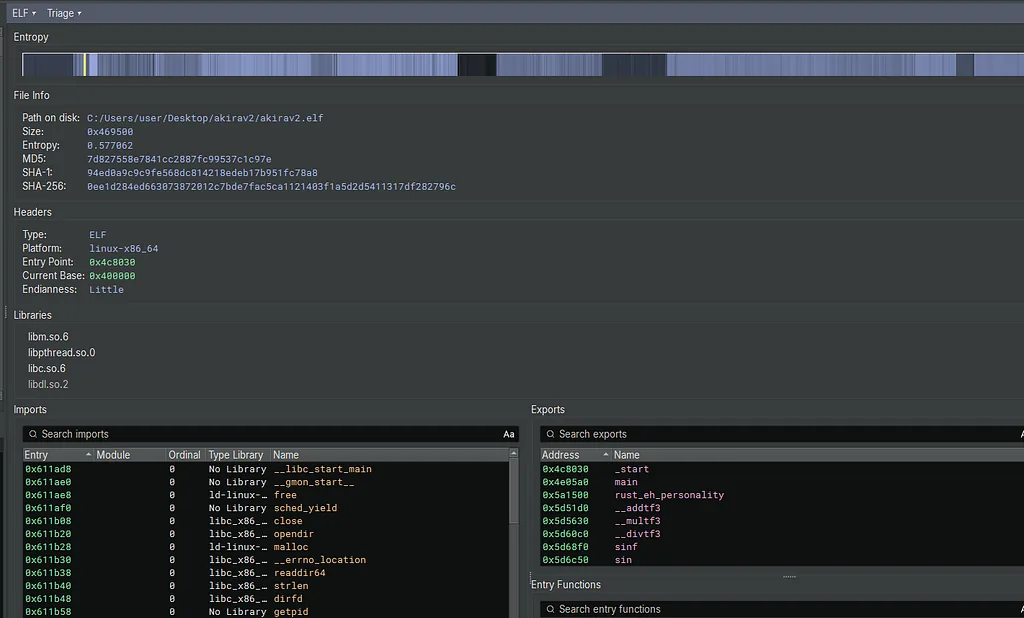
Triage summary in Binary Ninja
No**.debug_* sections anywhere in the list of Binary Ninja though.**
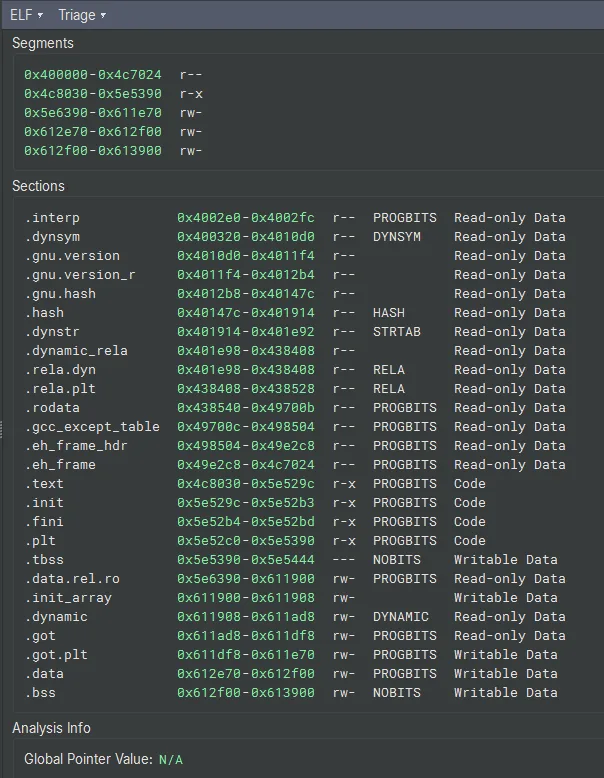
- .eh_frame and .eh_frame_hdr: these are unwind tables for exception handling, present in both debug and release Rust builds, but they are not DWARF debug info
- .gcc_except_table: exception handling landing pads, again not debug info
- .rodata (0x438540-0x49700b): this is large at ~370KB, which is where all the Rust panic strings, format strings, and string literals live. This is your goldmine for understanding program behaviour without symbols.
- .text (0x4c8030-0x5e529c): code segment, approximately 1.2MB of actual executable code
- .dynsym and .dynstr: dynamic symbol table, minimal since most code is statically linked
Though to be honest, it’s not 100% confirming this is a release build, especially > Rust 1.77 release, the way Rust binary stored debug info changed.
To be more confident, you might want to investigate
.rodata strings are extraordinarily revealing
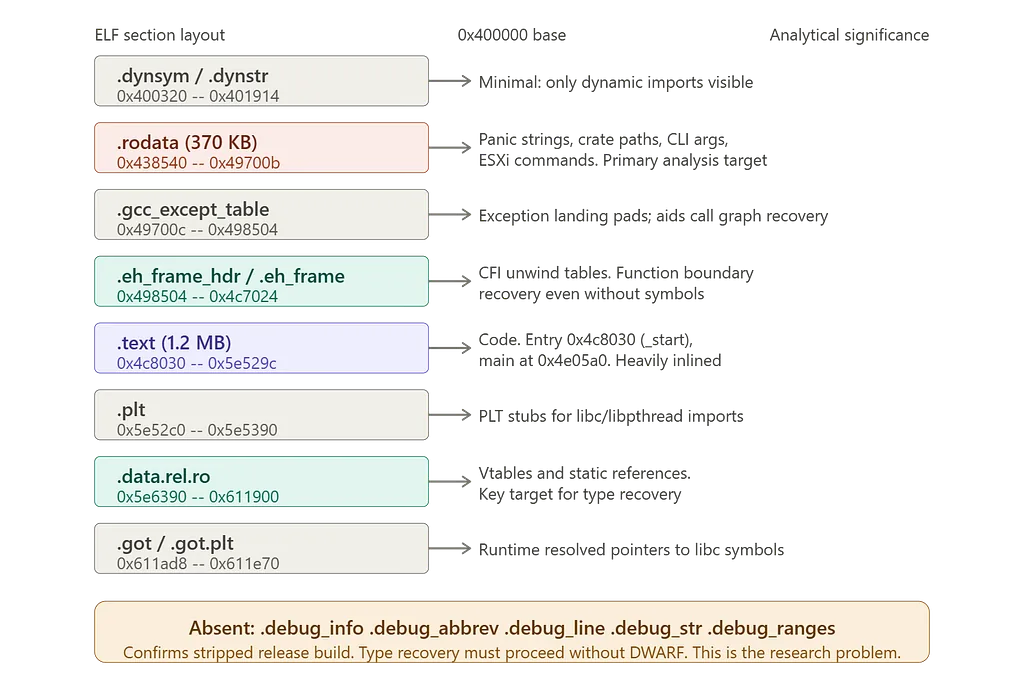
Summary info graph of sections for this analysis
In addition to the infograph above, it’s not 100% confirmed when the .debugxxx sections are absent.

Search result of `panic` in the string panel
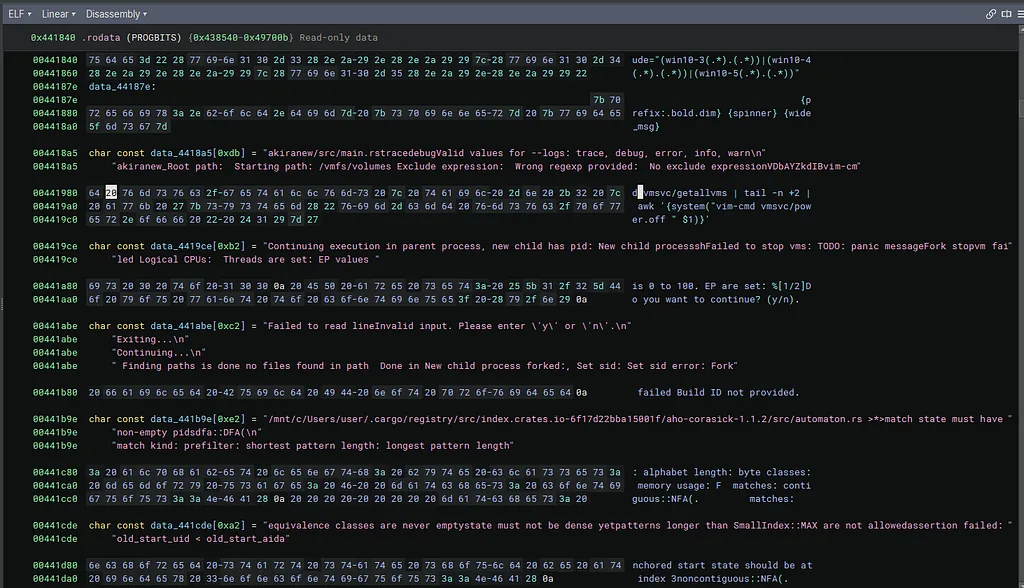
Some interesting strings found in the section of `.rodata`
Looking at the strings section and it contains multiple critical findings:
ESXi targeting confirmed:
/vmfs/volumes
vim-cmd vmsvc/getallvms | tail -n +2 | awk '{system("vim-cmd vmsvc/power.off " $1)}'
This is the exact shell command to enumerate and power off all VMs on an ESXi host, confirming the Check Point analysis.
ESXi is VMware’s bare-metal hypervisor. It runs directly on server hardware (no host OS underneath) and hosts multiple virtual machines. In enterprise environments it is extremely common: one physical server running ESXi might host dozens of VMs for databases, domain controllers, file servers, etc.
Why ransomware authors love targeting it?
- One infection, massive blast radius. Encrypt the ESXi host and every VM it manages goes down simultaneously, rather than having to compromise each machine individually.
- Often poorly monitored. EDR agents are rarely deployed on hypervisor hosts the way they are on Windows endpoints.
- Critical infrastructure. Organisations are under extreme pressure to pay because their entire virtualised environment is offline.
- NFS/VMFS datastores. VM disk images (.vmdk files) live on shared storage volumes that ESXi mounts directly, so the ransomware can enumerate and encrypt them efficiently without touching individual guest OSes.
The --path /vmfs/volumes default you saw in the Check Point article is the standard ESXi datastore mount point. That single directory contains the disk images for every hosted VM.
CLI argument strings:
akiranew/src/main.rs
Valid values for --logs: trace, debug, error, info, warn
Root path: Starting path: /vmfs/volumes
Exclude expression: Wrong regexp provided: No exclude expression
This reveals the seahorse CLI parser argument names directly from the source path embedded in panic strings.
Build ID string:
Build ID not provided.
Build ID detail useful for the analysis: The build ID for v2 (version 2024.1.30) is located at offset 0x41970 for 10 bytes. The ransomware requires either the /vmfs/volumes/ path to exist or a path to be explicitly specified, otherwise it will fail to execute entirely. This matches what Talos documented about the build ID check.
Crate paths leaking source structure:
/mnt/c/Users/user/.cargo/registry/src/index.crates.io-6f17d22bba15001f/aho-corasick-1.1.2/src/automaton.rs
This is extraordinarily useful. It reveals:
- The developer compiled on WSL (/mnt/c/Users/user/) on a Windows host
- The exact crate version: aho-corasick-1.1.2
- The Cargo registry path, confirming this is a standard Cargo build
TODO comment leaked into binary (0x4419ce):
char const data_4419ce[0xb2] = "Continuing execution in parent process, new child has pid: New child processshFailed to stop vms: TODO: panic messageFork stopvm failed"
The string TODO: panic message appears embedded within a stopvm error handling path in .rodata, suggesting the VM shutdown error branch uses a todo!() macro or placeholder panic rather than a proper error message, indicating incomplete error handling in that specific code path.
The full string at 0x4419ce is:
Continuing execution in parent process, new child has pid:
New child processsh
Failed to stop vms: TODO: panic message
Fork stopvm failed
These are not separate panic messages concatenated by the Rust runtime. They are multiple &str literals that LLVM merged into a single**.rodata entry** at compile time. Here is why.
How Rust panic strings reach .rodata
Every panic!(), eprintln!(), or string literal in Rust source becomes a &'static str pointing into .rodata. The Rust compiler lowers panic!("some message") roughly to:
core::panicking::panic_fmt(format_args!("some message"))
The format_args! macro constructs a fmt::Arguments struct at compile time. For simple string literals with no format arguments, LLVM sees these as adjacent static string data and, during its string merging optimisation pass (-O2/-O3), physically concatenates adjacent string literals that share no null terminator dependency into a single .rodata blob. The individual strings are then referenced by pointer and length pairs into offsets within that blob.
What you are seeing at 0x4419ce
Binja is showing you a single 178-byte (0xb2) merged blob containing what were originally four separate string literals in the source:
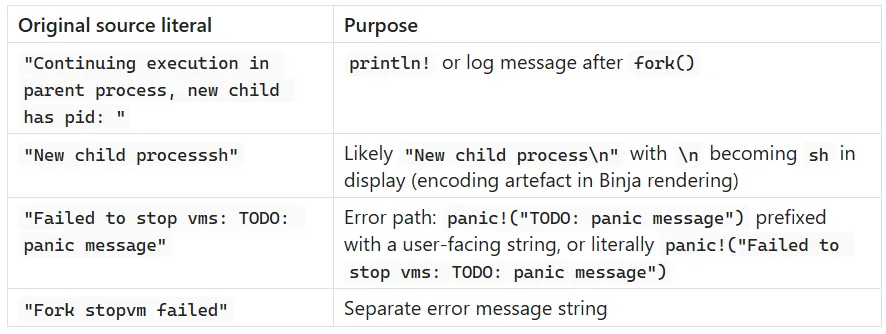
Why LLVM merges them
With --release and LTO enabled, LLVM's MergeGlobals and ConstantMerge passes fold adjacent read-only string data into contiguous blobs. Binja then displays the entire blob as one char const array from the start address to the end of the last string in the merged region. The individual strings are still referenced separately in the code via (ptr, len) fat pointer pairs pointing into offsets within the blob.
Verifying this in Binja
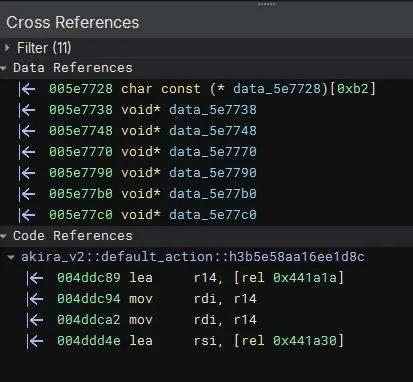
Cross Ref of 0x4419ce
To confirm the individual string boundaries, look at the cross-references to 0x4419ce. Each xref will use a different offset into the blob with a different length, corresponding to one of the original source strings. For example:
- 0x4419ce + 0x00, len=0x3c = "Continuing execution..."
- 0x4419ce + 0x3c, len=0x12 = "New child process..."
- 0x4419ce + 0x4e, len=0x27 = "Failed to stop vms: TODO: panic message"
- 0x4419ce + 0x75, len=0x12 = "Fork stopvm failed"
In Binja: right-click on data_4419ce > Cross References, and you will see each reference using a different offset, confirming the individual string boundaries.
Windows version regex in**.rodata:**
win10-3(.*)(.*)|win10-4(.*)(.*)|win10-5(.*)(.*)
Interesting: Windows version detection strings in a Linux ELF. This likely comes from a dependency that includes cross-platform compatibility checks.
aho-corasick crate confirmed: This is a string searching library, used here likely for file extension matching when deciding which files to encrypt.
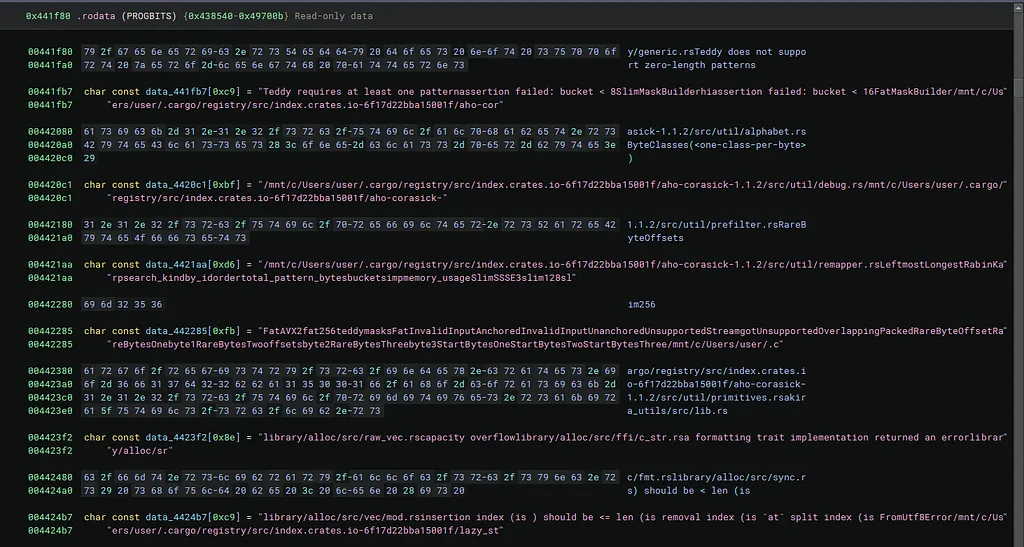
Additional crate paths confirmed:
/mnt/c/Users/user/.cargo/registry/src/index.crates.io-6f17d22bba15001f/aho-corasick-1.1.2/src/util/alphabet.rs
/mnt/c/Users/user/.cargo/registry/src/index.crates.io-6f17d22bba15001f/aho-corasick-1.1.2/src/util/debug.rs
/mnt/c/Users/user/.cargo/registry/src/index.crates.io-6f17d22bba15001f/aho-corasick-1.1.2/src/util/remapper.rs
/mnt/c/Users/user/.cargo/registry/src/index.crates.io-6f17d22bba15001f/aho-corasick-1.1.2/src/util/primitives.rs
Standard library paths:
library/alloc/src/raw_vec.rs
library/alloc/src/ffi/c_str.rs
library/alloc/src/sync.rs
library/alloc/src/vec/mod.rs
library/alloc/src/fmt.rs
lazy_st crate (truncated):
/mnt/c/Users/user/.cargo/registry/src/index.crates.io-6f17d22bba15001f/lazy_st...
This is almost certainly lazy_static or once_cell, used for global state initialisation. Common in Rust malware for initialising encryption keys or configuration once at startup.
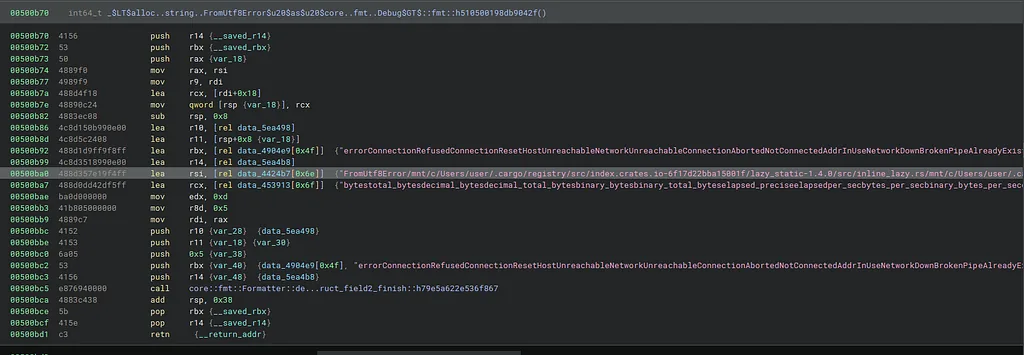
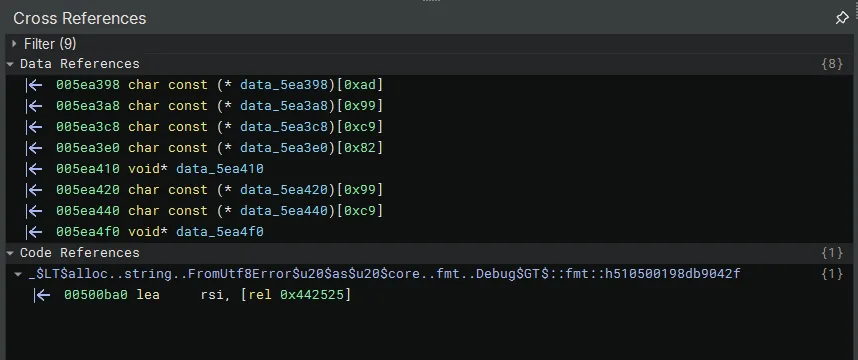
Xref
This is the cross-reference panel for the lazy_st blob, not the next address. But the code reference is extremely revealing:
_$LT$alloc..string..FromUtf8Error$u20$as$u20$core..fmt..Debug$GT$::fmt::h510500198db9042f
And the instruction:
lea rsi, [rel 0x442525]
This tells you the code is loading a pointer into the middle of the blob at 0x442525, which is an offset within data_4424b7. The mangled symbol name FromUtf8Error confirms this blob is primarily about the alloc::string::FromUtf8Error Debug implementation, and lazy_st is simply the tail end of an adjacent panic path that got merged into the same blob.
Navigate to 0x442525 directly in Binja to see what the string looks like from that offset. But more importantly, to find the continuation of lazy_st, go to:
g -> 0x442580
That is 0x4424b7 + 0xc9, the first byte after this blob ends. What Binja shows there will either be a new char const entry starting with atic or a completely unrelated string. Share that screenshot and we will know definitively.
Now confirmed. Look at address 0x500ba0:
lea rsi, [rel data_4424b7[0x6e]]
And Binja’s inline comment shows the full string at that offset:
"FromUtf8Error/mnt/c/Users/user/.cargo/registry/src/index.crates.io-6f17d22bba15001f/lazy_static-1.4.0/src/inline_lazy.rs/mnt/c/Users/user/.c
Confirmed: lazy_static-1.4.0
The exact version is 1.4.0, not unknown. The source file is inline_lazy.rs, which is the internal implementation file for lazy_static's hidden static guarding mechanism.

.../lazy_static-1.4.0/src/inline_lazy.rs/mnt/c/Users/user/.cargo/registry/src/index.crates.io-6f17d22bba15001f/unicode-wi
New crate partially confirmed: unicode-wi...
This is almost certainly unicode-width, a standard Rust crate for determining the display width of Unicode characters. It is a very common dependency pulled in by terminal/CLI output crates. Given Akira v2 uses indicatif for progress bars and simplelog for logging, unicode-width as a transitive dependency makes complete sense.
To confirm the full name and version, navigate to the next address after this blob ends in Binja. The continuation should show dth-x.x.x completing unicode-width.
Rust struct names leaking:
FatAVX2, SlimSSSE3, SlimAVX2 are Rust struct names defined inside aho-corasick's Teddy packed search engine. They are not algorithm names in the abstract sense. Specifically for SIMD backend implementations of the Teddy packed search algorithm.:
- SlimSSSE3 is a struct wrapping a 128-bit SSSE3 Teddy searcher
- FatAVX2 is a 256-bit AVX2 fat Teddy searcher.
- These are selected at runtime based on CPU feature detection: SlimSSSE3 is chosen when AVX2 is unavailable, FatAVX2 when AVX2 is available and the fat variant is preferred.
FatAVX2fat256teddymasksFatInvalidInputAnchoredInvalidInputUnanchoredUnsupportedStreamgotUnsupportedOverlappingPackedRareByteOffsetRa...
/mnt/c/Users/user/.cargo/registry/src/index.crates.io-6f17d22bba15001f/aho-corasick-1.1.2/src/util/remapper.rsLeftmostLongestRabinKarpsearch_kindby_idordertotal_pattern_bytesbucketsimpmemory_usageSlimSSSE3slim128sl
akira_utils/src/lib.rs:
/mnt/c/Users/user/.cargo/registry/src/...akira_utils/src/lib.rs
Look carefully at line 004423e0: a_utils/src/lib.rs. Combined with the prefix on the line above ending in akir, this reads as akira_utils/src/lib.rs. This is a custom internal crate named akira_utils, not a public crates.io dependency. This means the malware authors structured their code as a Cargo workspace with at least one internal library crate.
What this tells you about the binary structure
You can now reconstruct a partial Cargo.toml dependency tree purely from .rodata:
[dependencies]
aho-corasick = "1.1.2"      # confirmed, multiple source files
lazy_static = "1.4.0"       # Confirmed

[workspace]
members = [
    "akira_utils",           # internal crate confirmed
]
The crates.io registry hash 6f17d22bba15001f is consistent across all paths, confirming these all came from the same Cargo build environment and the same registry snapshot.
Panic String Analysis
This is a strong methodological point: panic string analysis recovers the internal crate architecture of a stripped Rust binary without any symbol information. Specifically:
- Internal workspace crate names (akira_utils) recoverable
- Exact third-party crate versions (aho-corasick-1.1.2) recoverable
- Developer platform (WSL on Windows, same username user throughout) recoverable
- SIMD feature flags (AVX2, SSSE3) inferable from algorithm variant names
None of this requires DWARF, symbol tables, or dynamic analysis. It is purely static .rodata recovery
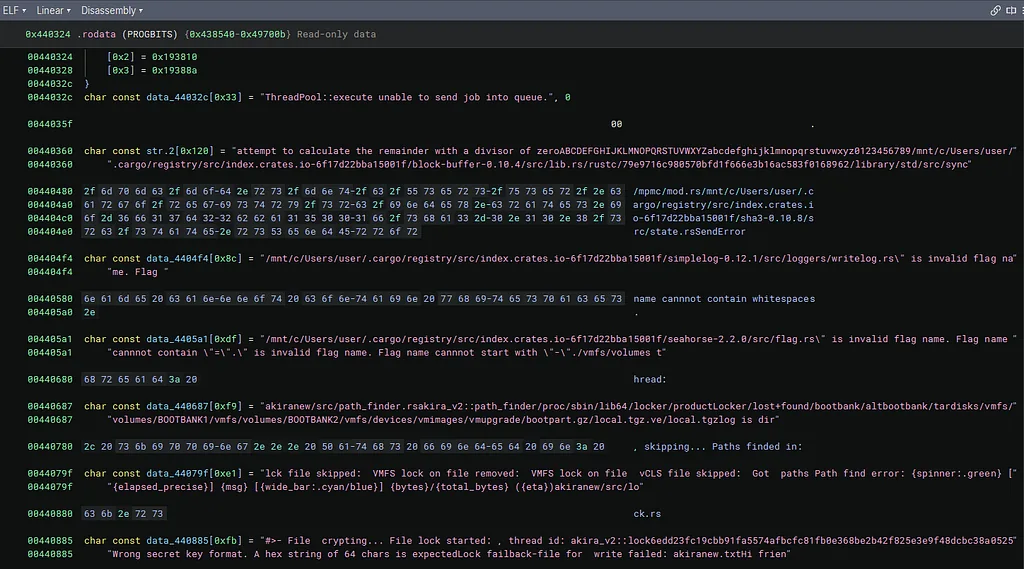
Additional crates and internal paths
Additional crates and internal paths
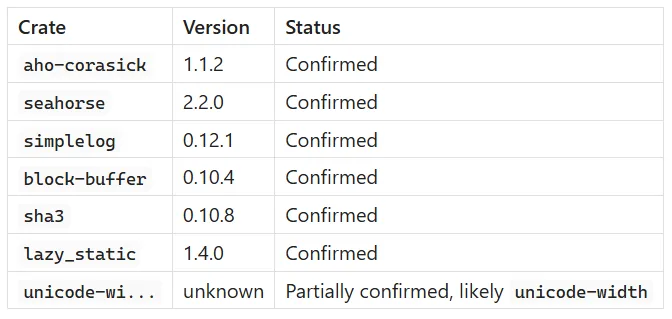
New crate confirmed: block-buffer-0.10.4
/mnt/c/Users/user/.cargo/registry/src/index.crates.io-6f17d22bba15001f/block-buffer-0.10.4/src/lib.rs
This is a cryptography support crate used by digest algorithm implementations. Confirms the crypto pipeline more precisely.
New crate confirmed: sha3-0.10.8
/mnt/c/Users/user/.cargo/registry/src/index.crates.io-6f17d22bba15001f/sha3-0.10.8/src
SHA-3 hashing, likely used for key derivation or integrity checking.
New crate confirmed: simplelog-0.12.1
/mnt/c/Users/user/.cargo/registry/src/index.crates.io-6f17d22bba15001f/simplelog-0.12.1/src/loggers/writelog.rs
This is the logging crate. Confirms the --logs trace/debug/error/info/warn CLI argument you saw earlier.
New crate confirmed: seahorse-2.2.0
/mnt/c/Users/user/.cargo/registry/src/index.crates.io-6f17d22bba15001f/seahorse-2.2.0/src/flag.rs
The CLI argument parser, version now precisely pinned.
Internal source paths:
akiranew/src/path_finder.rs
akira_v2::path_finder
Confirms a dedicated path_finder module for filesystem enumeration.
akiranew/src/lock.rs
The encryption locking module, source path directly visible.
ESXi path exclusions visible:
/proc/sbin/lib64/locker/productLocker/lost+found/bootbank/altbootbank/tardisks/vmfs/volumes/BOOTBANK1/vmfs/volumes/BOOTBANK2/vmfs/devices/vmimages/vmupgrade/bootpart.gz/local.tgz/local.tgzlog
These are ESXi-specific paths that the ransomware skips during encryption. Directly recoverable from static analysis.
ThreadPool::execute error string:
ThreadPool::execute unable to send job into queue.
Confirms a custom thread pool implementation with explicit error handling.
indicatif spinner format strings:
{spinner:.green} [{elapsed_precise}] {msg} [{wide_bar:.cyan/blue}] {bytes}/{total_bytes} ({eta})
The progress bar format string from the indicatif crate, directly confirming its use for operator-facing encryption progress display.
mpmc/mod.rs path:
/mpmc/mod.rs
Multi-producer multi-consumer channel, part of the threading architecture for parallel encryption workers.
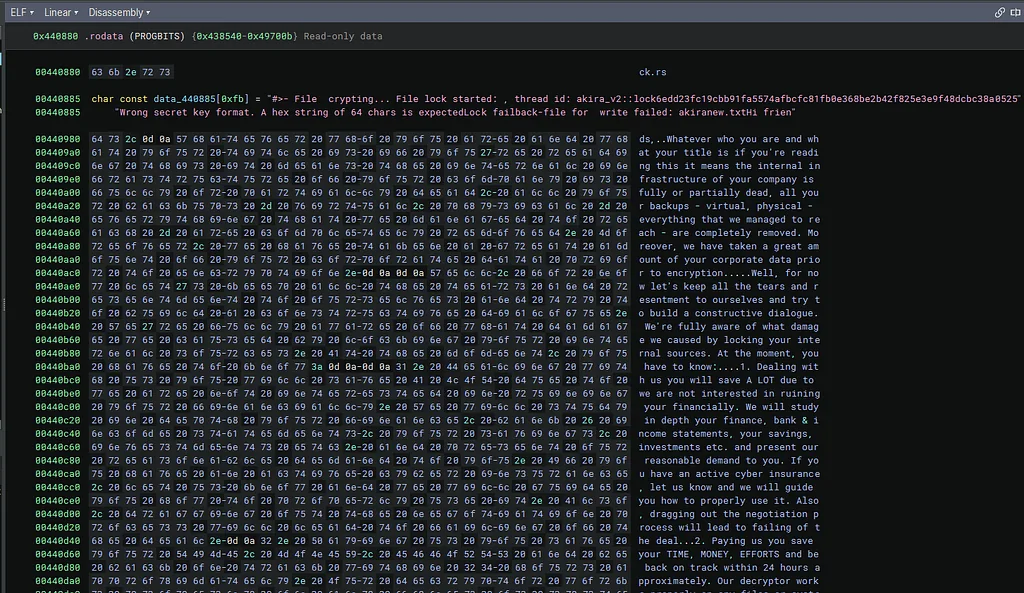
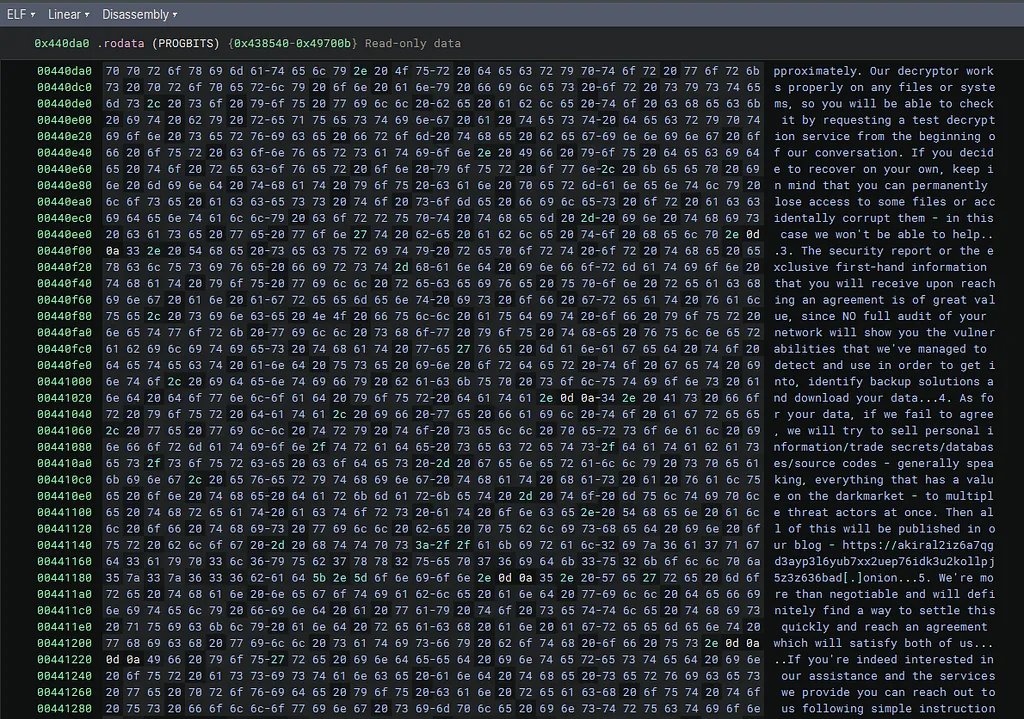
The ransom note is embedded directly in .rodata
This is a significant finding. The entire akiranew.txt ransom note text is stored as a static string literal in .rodata starting around 0x440da0. Visible fragments include:
- Decryptor offer and negotiation text
- .3. The security report or the exclusive first-hand information
- Reference to darkmarket sale threat
- Onion address: akiral2iz6a7qgd3ayp3l6yub7xx2uep76idk3u2kollpj5z3z636bad[.]onion
- TOR browser instructions
- Chat link: https://akiralkzxzq2dsrzsrvbr2xgbbu2wgsmxryd4csgfameg52n7efvr2id[.]onion
- Code: 7818-NX-VVGG-FSFV
This is the complete ransom note hardcoded as a single static string, not generated dynamically at runtime, it is a compile-time constant embedded verbatim.
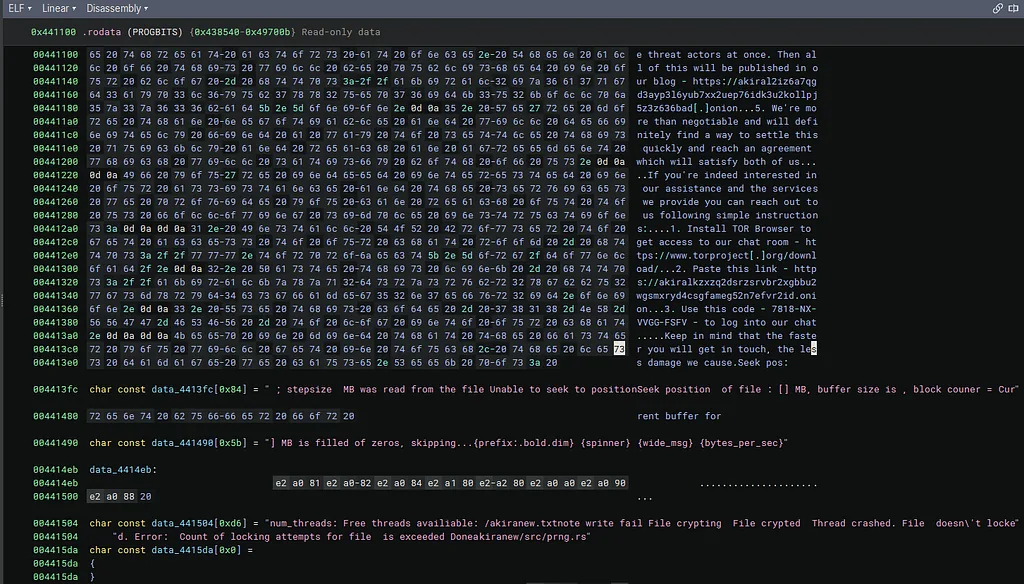
Encryption operational strings
prng.rs internal source path:
akiranew/src/prng.rs
A first-party PRNG module (akiranew/src/prng.rs) in the malware’s own source tree. Correction (24 June 2026): an earlier version suggested the authors hand-rolled a generator instead of using a crate. The binary shows otherwise. It links rand 0.8.5, rand_chacha 0.3.1 and getrandom 0.2.10, and the demangled symbols expose ThreadRng as ReseedingRng<ChaCha12Core, OsRng>, that is, the standard ChaCha12 CSPRNG reseeded from OsRng. No hand-rolled LCG or xorshift constants are present. So prng.rs is best read as a thin first-party wrapper over the rand crate (used for key material and random IDs), not a bespoke generator.
Threading and file locking strings:
num_threads:
Free threads available:
/akiranew.txt
note write fail
File crypting
File crypted
Thread crashed.
File doesn't locked.
Error: Count of locking attempts for file is exceeded
Done
These are all operator-facing runtime status messages. Crucially akiranew/src/prng.rs is the source file for the PRNG, and the locking attempt counter confirms a retry mechanism for file locking during encryption.
Encryption progress format strings:
; stepsize  MB was read from the file
Unable to seek to position
Seek position of file : [] MB, buffer size is , block counter = Current buffer for
] MB is filled of zeros, skipping...{prefix:.bold.dim} {spinner} {wide_msg} {bytes_per_sec}
These reveal the chunked encryption algorithm: the binary reads files in blocks (stepsize MB), seeks to positions, skips zero-filled blocks, and reports bytes per second to the operator.
akira_v2::lock namespace confirmed:
akira_v2::lock6edd23fc19cbb91fa5574afbcfc81fb0e368be2b42f825e3e9f48dcbc38a0525
This mangled symbol name contains what appears to be a hash suffix, consistent with Rust’s symbol mangling scheme for disambiguating generic instantiations.
Wrong secret key format error:
Wrong secret key format. A hex string of 64 chars is expected
Reveals the encryption key is passed as a 64-character hex string (32 bytes), consistent with a 256-bit key.
Updated Cargo dependency table
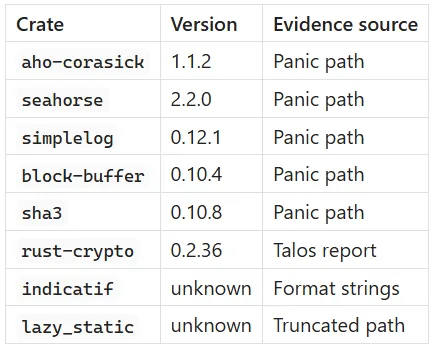
Internal modules recovered: akira_utils, path_finder, lock, prng
All of this is recoverable purely from .rodata static analysis without executing the binary, without DWARF, and without symbols. That is your core thesis demonstrated in practice.
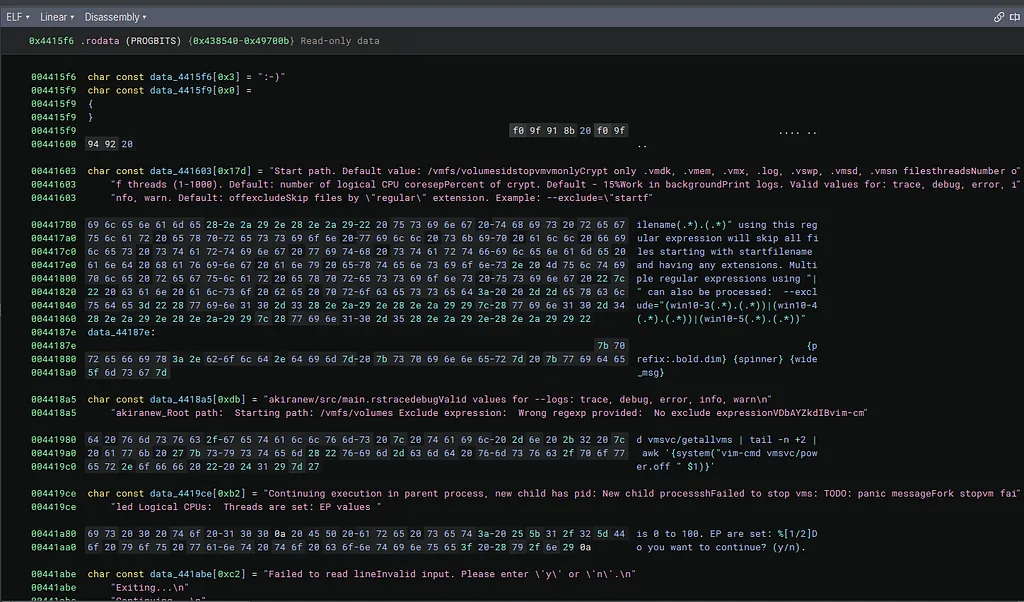
The full CLI help string recovered at 0x441603
This is the most valuable string in the screenshot. The complete help text is visible:
Start path. Default value: /vmfs/volumes
idstopvm
vmonlyCrypt only .vmdk, .vmem, .vmx, .log, .vswp, .vmsd, .vmsn files
threadsNumber of threads (1-1000). Default: number of logical CPU cores
epPercent of crypt. Default - 15%
Work in background
Print logs. Valid values for: trace, debug, error, info, warn. Default: off
excludeSkip files by "regular" extension. Example: --exclude="startf"
This reconstructs the complete CLI interface of Akira v2:
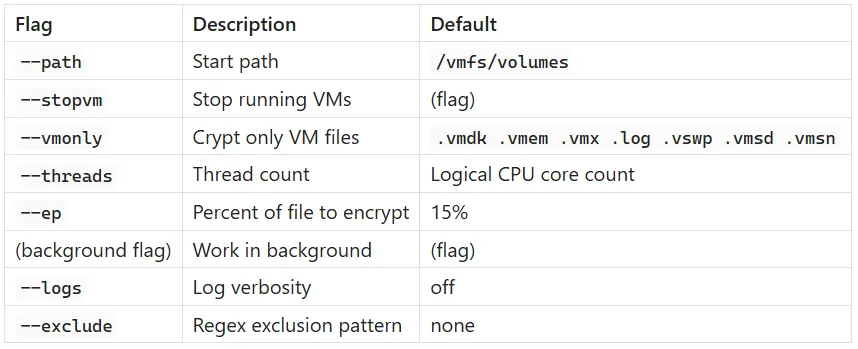
The --ep 15% default is particularly significant: Akira v2 only encrypts 15% of each file by default, which is a deliberate speed optimisation. Enough to corrupt the file but fast enough to maximise the number of files encrypted before detection.
Regex exclusion pattern at 0x441780
ilename(.*)(.*)" using this regular expression will skip all files
starting with startfilename and having any extensions.
Multiple regular expressions using "|" can also be processed:
--exclude="(win10-3(.*)(.*))|(win10-4(.*)(.*))|(win10-5(.*)(.*))
This is the help text for --exclude, and the example regex win10-3|win10-4|win10-5 is revealing: it shows the operators were using Windows version strings as exclusion patterns, suggesting they selectively avoided encrypting certain Windows VM guests while targeting others.
akiranew/src/main.rs source path confirmed at 0x4418a5
akiranew/src/main.rstraced
The source file name akiranew/src/main.rs is directly embedded, confirming the project root crate name is akiranew, not akira_v2. The v2 designation is a researcher label, not the developer's own naming.
The 0x4419ce string context now fully clear
With this screenshot you can see the string immediately above 0x4419ce:
d vmsvc/getallvms | tail -n +2 |
awk '{system("vim-cmd vmsvc/power.off " $1)}'
Then at 0x4419ce:
Continuing execution in parent process, new child has pid:
New child processsh
Failed to stop vms: TODO: panic message
Fork stopvm failed
Logical CPUs:  Threads are set: EP values
This gives you the full operational sequence of the --stopvm and --fork flow:
- Execute shell command to power off all VMs
- Fork child process for encryption
- Report child PID to operator
- If stopvm fails: emit the TODO: panic message placeholder error
- Report thread and EP configuration
The TODO: panic message is definitively the stopvm failure error handler, confirming it is a developer placeholder left in the stopvm error branch specifically.
Interactive prompt strings at 0x441a80
is 0 to 100. EP are set: %[1/2]
Do you want to continue? (y/n).
And at 0x441abe:
Failed to read line
Invalid input. Please enter 'y' or 'n'.
Exiting...
Continuing...
This reveals Akira v2 has an interactive confirmation prompt before beginning encryption, where the operator confirms the EP percentage and thread settings. This is an operator safety check, not something visible in prior published analyses.
Updated internal module map
You can now reconstruct the project structure almost completely from .rodata alone:
akiranew/
├── src/
│   ├── main.rs          (CLI parsing, interactive prompt, fork/stopvm)
│   ├── lock.rs          (encryption logic)
│   ├── path_finder.rs   (filesystem enumeration)
│   └── prng.rs          (custom PRNG)
└── Cargo.toml
    (workspace member: akira_utils)
All recovered without symbols, without DWARF, purely from panic strings and format literals in .rodata. This is now a very strong empirical demonstration of your thesis.
Updated dependency table
The Control Flow Map
The top-level call chain is:
main -> default_action -> lock -> lock_closure
- main: collects CLI arguments, initialises the seahorse App struct, calls app.run(args).
- default_action: the seahorse callback; reads flag values, optionally shuts down VMs, then calls lock.
- lock: launches worker threads.
- lock_closure: the actual encryption logic, running per thread.
Section 1: How args().collect() Works

The malware’s first action is:
let program_args: Vec<String> = args().collect();
Tracing what this produces in memory requires following a four-layer type unwrapping chain.
The unwrapping chain
The article traces the type system from the public API down to bytes. Each step is a wrapper that hides the real representation.
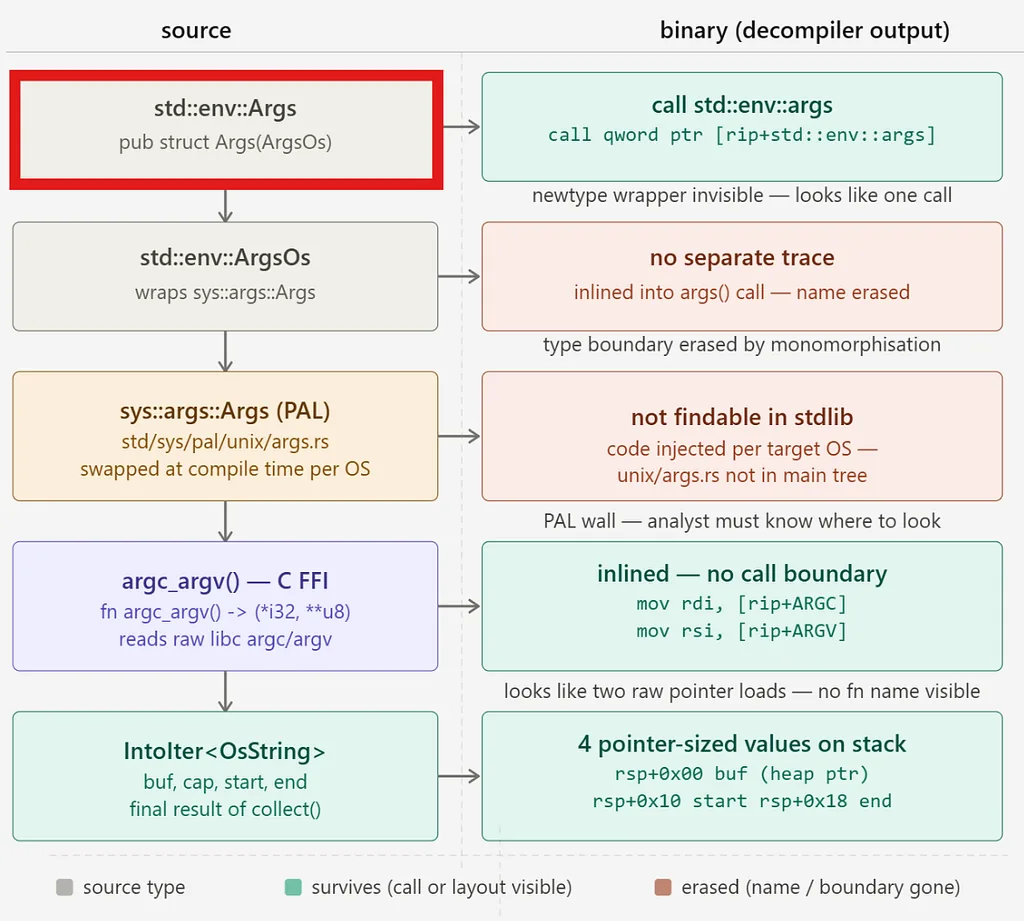
std::env::args()
  -> returns Args
      -> wraps ArgsOs
          -> wraps sys::args::Args  (PAL type, OS-specific)
              -> on Unix: Vec<OsString>.into_iter()
                  -> IntoIter<OsString>
The key insight: the public type Args and its iterator wrapper are thin newtypes. By the time you reach the PAL implementation, the real data is a Vec
that was built by reading argc/argv from C FFI, then converted to OsString entries.
The std::env::args() function returns Args, which wraps ArgsOs, which wraps sys::args::Args. Both outer wrappers are zero-overhead newtypes. The real work happens in sys/pal/unix/args.rs, the PAL (Platform Abstraction Layer) implementation for Unix targets.
This file does not live in the main std source tree. It is swapped in at compile time based on the target OS, which is why you cannot find sys::args::args by grepping the standard library directly.
Step 1: The Public API
From env.rs (line ~756):
pub struct Args {
    inner: ArgsOs,
}

pub struct ArgsOs {
    inner: sys::args::Args,
}

pub fn args() -> Args {
    Args { inner: args_os() }
}

pub fn args_os() -> ArgsOs {
    ArgsOs { inner: sys::args::args() }
}
Args and ArgsOs are pure newtypes. They add zero bytes of overhead. The only real data lives in sys::args::Args, which is a PAL type.
sys::args::Args is a PAL type because its concrete definition lives inside one of those OS-specific directories, not in a shared location. On Unix (which includes ESXi/Linux), it is defined in sys/pal/unix/args.rs(line ~61) as:
pub struct Args {
    iter: vec::IntoIter<OsString>,
}
On Windows it would be defined differently, potentially with a different internal representation. I will list them in the section of Further Reading below.
Note: The practical consequence for RE is that if you look for sys::args::Args in the main standard library source you will not find it, because there is no single canonical definition. You have to know which PAL branch was compiled in, which is determined by the binary's target OS. For Akira v2 targeting ESXi, that means the Unix branch, and therefore the vec::IntoIter
layout we traced through.
Step 2: The PAL Implementation (Unix)
PAL stands for Platform Abstraction Layer. It is a pattern in the Rust standard library where OS-specific implementations are swapped in at compile time based on the target platform.
The way it works structurally is that std has a module sys::pal with subdirectories for each supported OS:
std/src/sys/pal/
    unix/
    windows/
    wasi/
    ...
Each subdirectory implements the same interface, but with platform-native code inside. The compiler selects the correct one via #[cfg(target_os = "...")] attributes. The rest of std calls into sys::pal without knowing or caring which OS is underneath.
Because Akira v2 targeted ESXi (Linux-based), the relevant PAL is sys/pal/unix/args.rs. The article quotes the full function:
/// Returns the command line arguments
pub fn args() -> Args {
    let (argc, argv) = imp::argc_argv();          // (1)
    let mut vec = Vec::with_capacity(argc as usize);
    for i in 0..argc {
        let ptr = unsafe { argv.offset(i).read() }; // (2)
        if ptr.is_null() { break; }
        let cstr = unsafe { CStr::from_ptr(ptr) };  // (3)
        vec.push(OsStringExt::from_vec(cstr.to_bytes().to_vec())); // (4)
    }
    Args { iter: vec.into_iter() }                 // (5)
}
What each line does:
(1) argc_argv() calls into the C runtime via FFI. On Linux, argc and argv are passed into the process by the kernel via the ELF aux vector and made available through glibc's .init_array mechanism. This gives you the classic C int argc, char** argv pair.
(2) argv.offset(i).read() is raw pointer arithmetic. argv is a *const *const c_char. .offset(i) moves the pointer by i * 8 bytes (on x64), then .read() dereferences it, giving you a *const c_char pointing to the i-th argument string.
(3) CStr::from_ptr(ptr) wraps that pointer as a null-terminated C string, no copy yet.
(4) cstr.to_bytes().to_vec() copies the raw bytes (excluding the null terminator) into a Vec
(5) vec.into_iter() is the key transformation. It consumes the Vec
Step 3: The Concrete Memory Layout
The definitionof IntoIter in the current compiler source (lines 45–61 of into_iter.rs) is:
pub struct IntoIter<T, A: Allocator = Global> {
    pub(super) buf:     NonNull<T>,       // pointer to start of heap allocation
    pub(super) phantom: PhantomData<T>,   // zero-size, no bytes
    pub(super) cap:     usize,            // total capacity
    pub(super) alloc:   ManuallyDrop<A>,  // allocator (Global = zero-size)
    pub(super) ptr:     NonNull<T>,       // pointer to next element to yield
    pub(super) end:     *const T,         // pointer one-past last remaining element
}
With the default Global allocator (which is zero-sized), the in-memory layout on x64 is:
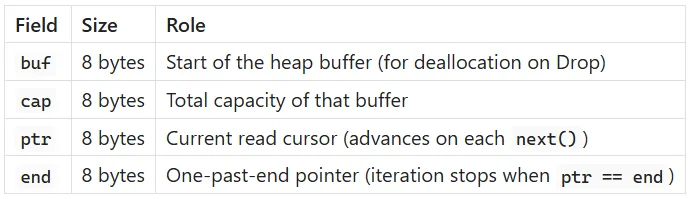
Total: 32 bytes on x64. phantom and alloc (Global) contribute zero bytes.
The actual OsString objects live on the heap at the address buf points to.
Each OsString on that heap is, on Linux, a Vec
[ ptr: 8 bytes ][ len: 8 bytes ][ cap: 8 bytes ]
RawVec
PhantomData is zero-sized. Global allocator is zero-sized. Cap is #[repr(transparent)] over usize. Unique
pub(crate) struct RawVec<T, A: Allocator = Global> {
    inner: RawVecInner<A>,
    _marker: PhantomData<T>,
}

struct RawVecInner<A: Allocator = Global> {
    ptr: Unique<u8>,
    cap: Cap,
    alloc: A,
}
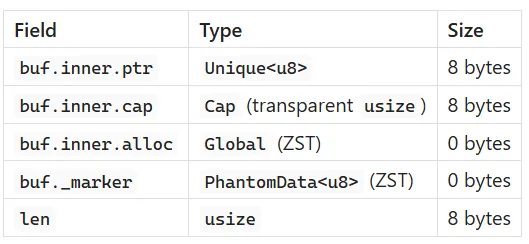
So if you ran the binary with three arguments, the heap buffer at buf would contain three consecutive 24-byte structs, each pointing to its own heap allocation holding the raw argument bytes.
Quick recap
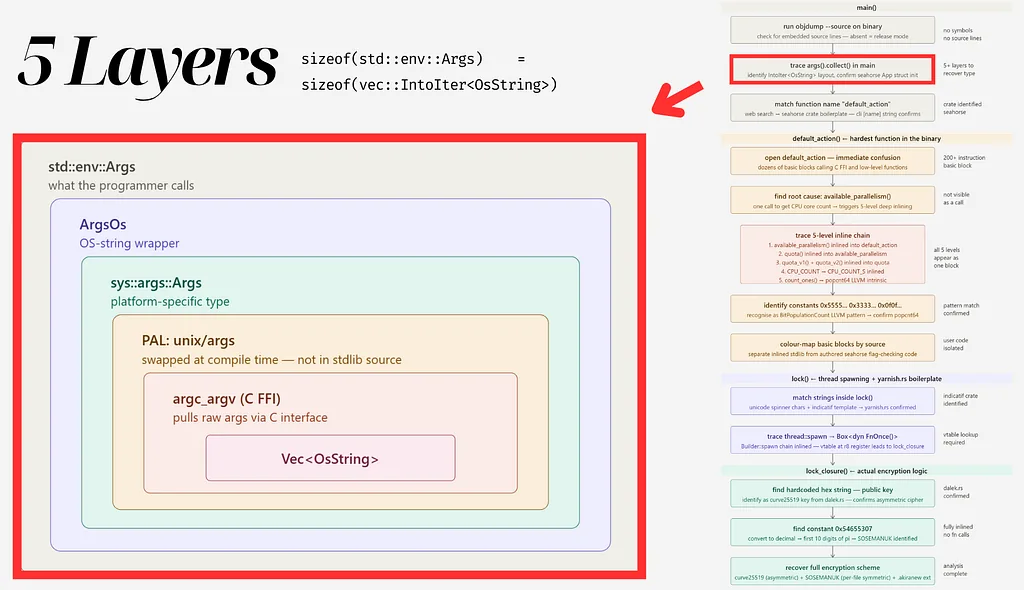
We still have a long road to go from here…
1. Entry point
pub fn args() -> Args {
    Args { inner: args_os() }
}
pub fn args_os() -> ArgsOs {
    ArgsOs { inner: sys::args::args() }   // calls into PAL
}
Both Args and ArgsOs are newtypes. Zero overhead.
2. PAL for Linux ( sys/pal/unix/args.rs)
The imp module for Linux stores argc/argv as two atomics set during process init (link here, line 129–130):
static ARGC: AtomicIsize = AtomicIsize::new(0);
static ARGV: AtomicPtr<*const u8> = AtomicPtr::new(ptr::null_mut());
These are populated via .init_array.00099 (on glibc Linux) before main runs. The function argc_argv() simply reads them with Ordering::Relaxed.
pub fn args() -> Args {
    let (argc, argv) = imp::argc_argv();
    let mut vec = Vec::with_capacity(argc as usize);
    for i in 0..argc {
        let ptr = unsafe { argv.offset(i).read() };
        if ptr.is_null() { break; }
        let cstr = unsafe { CStr::from_ptr(ptr) };
        vec.push(OsStringExt::from_vec(cstr.to_bytes().to_vec()));
    }
    Args { iter: vec.into_iter() }
}
And sys::args::Args is defined immediately below in the same file:
pub struct Args {
    iter: vec::IntoIter<OsString>,
}
So sys::args::Args is just a newtype over vec::IntoIter
3. Concrete memory layout
After vec.into_iter(), on x64 Linux with Global allocator:
IntoIter<OsString> (32 bytes on stack or in parent struct):
  +0x00  buf  (NonNull<OsString>)  = pointer to heap buffer
  +0x08  cap  (usize)              = total allocated slots
  +0x10  ptr  (NonNull<OsString>)  = next element to yield
  +0x18  end  (*const OsString)    = one past last element
Each OsString on the heap is a Vec
OsString (24 bytes):
  +0x00  ptr  (*mut u8)  = pointer to the argument string bytes
  +0x08  len  (usize)    = length of the string
  +0x10  cap  (usize)    = capacity
4. What next() looks like in assembly
Each call to next() does:
- Compare ptr against end. If equal, return None.
- Read the OsString at ptr (24 bytes).
- Increment ptr by 24 (size_of::
() on Linux). - Return Some(osstring).
When the outer Args::next() in env.rs is called, it additionally calls .into_string().unwrap() on the OsString, which validates UTF-8 and either reuses the allocation or panics.
The Key RE Insight
When you see the assembly for args().collect() in the Akira v2 binary, the confusing pointer arithmetic is exactly this: reading the ARGC/ARGV globals, looping over argv with stride-8 pointer arithmetic, copying each C string into a heap Vec
What argc_argv() does on Linux
The PAL’s argc_argv() function reads two atomics, ARGC and ARGV, that were written during process initialisation. On glibc Linux, a function registered in .init_array.00099 receives (argc, argv, envp) from glibc before main runs and stores them in these atomics. Reading them back is a single Ordering::Relaxed load on each.
Building the Vec
The args() function then:
- Calls Vec::with_capacity(argc as usize) to pre-allocate.
- Iterates 0..argc, using raw pointer arithmetic (argv.offset(i).read()) to read each *const c_char.
- Wraps each pointer as a CStr, copies the bytes into a Vec
via to_bytes().to_vec(), and pushes it as an OsString via OsStringExt::from_vec. - Calls vec.into_iter(), producing a vec::IntoIter
.
On Linux, OsString is a Vec
The concrete memory layout
The vec::IntoIter
buf:     NonNull<T>       // 8 bytes: pointer   to heap allocation
cap:     usize            // 8 bytes: total capacity
alloc:   ManuallyDrop<A>  // 0 bytes: Global allocator is ZST
ptr:     NonNull<T>       // 8 bytes: next element to yield
end:     *const T         // 8 bytes: one-past-last element
Total header: 32 bytes on x64. The heap buffer at buf holds argc consecutive 24-byte OsString values. Iteration advances ptr by 24 bytes per call to next() and stops when ptr == end.
When collect() runs on the outer Args iterator, each OsString is validated as UTF-8 and converted to String. The final result is a Vec
RE implication: the confusing pointer arithmetic around args().collect() in the binary is stride-8 (reading argv[]) followed by string copies followed by stride-24 iteration. Once you know those two stride values, the assembly becomes readable.
Further Reading
1. Some useful crates for CLI development
There are several established approaches in Rust:
Full-featured crates:
- clap : the dominant choice, supports derive macros, subcommands, validation, shell completions
- argh : Google’s crate, derive-based, optimised for binary size
Minimal/lightweight crates:
- pico-args : zero dependencies, manual parsing, very small
- lexopt: low-level, explicit, good for when you want full control
- seahorse : what Akira used, builder pattern, minimal
Manual approaches:
- std::env::args() directly: no dependency, just iterate and match strings yourself
- std::env::args_os(): same but keeps OsString, useful when arguments may not be valid UTF-8
Other:
- structopt: older derive-based approach, now largely superseded by clap v3+
For malware authors, the interesting trade-off is binary size and recognisability. clap produces very identifiable strings and patterns in the binary. seahorse or pico-args leave a much smaller and less distinctive footprint, which may be part of why it was chosen here.
2. Windows vs Linux: Building the Vec
The two implementations are fundamentally different because Windows and Unix have different models for how arguments reach a process.
The core difference
On Linux, the kernel passes arguments as a char** argv array: each argument is already a separate null-terminated byte string. The PAL just reads them one by one.
On Windows, there is no argv array. The Win32 API delivers the entire command line as a single UTF-16 string via GetCommandLineW(). The PAL has to parse that string itself to split it into individual arguments.
What the Windows args() does
Source code is here (line 21), path is Rust/library/std/src/sys/pal/windows/args.rs#L21
pub fn args() -> Args {
    // SAFETY: `GetCommandLineW` returns a pointer to a null terminated UTF-16
    // string so it's safe for `WStrUnits` to use.
    unsafe {
        let lp_cmd_line = c::GetCommandLineW();           // (1)
        let parsed_args_list = parse_lp_cmd_line(         // (2)
            WStrUnits::new(lp_cmd_line),
            || current_exe()...
        );
        Args { parsed_args_list: parsed_args_list.into_iter() }
    }
}
(1) GetCommandLineW() is a Win32 API call returning a pointer to a null-terminated UTF-16 string. The entire command line is one blob, e.g. myapp.exe --threads 8 --stopvm.
(2) parse_lp_cmd_line is a hand-written parser implementing the Microsoft C/C++ argument parsing rules. It handles:
- Whitespace as argument separators
- Quoted strings (space inside quotes is literal)
- Backslash escaping before quotes (odd number of backslashes escapes the quote)
- Double-quote escaping inside a quoted string
Each parsed token is pushed as OsString::from_wide(&cur[..]), converting UTF-16 code units into a WTF-8 encoded OsString.
Wtf8Buf has exactly two fields: bytes (a Vec
, which is 24 bytes on x64: ptr, len, cap) and is_known_utf8 (a bool, 1 byte, padded to 8 bytes by alignment). So Wtf8Buf is 32 bytes on x64.
pub struct Wtf8Buf {
    bytes: Vec<u8>,
    is_known_utf8: bool,
}
Step-by-step comparison table
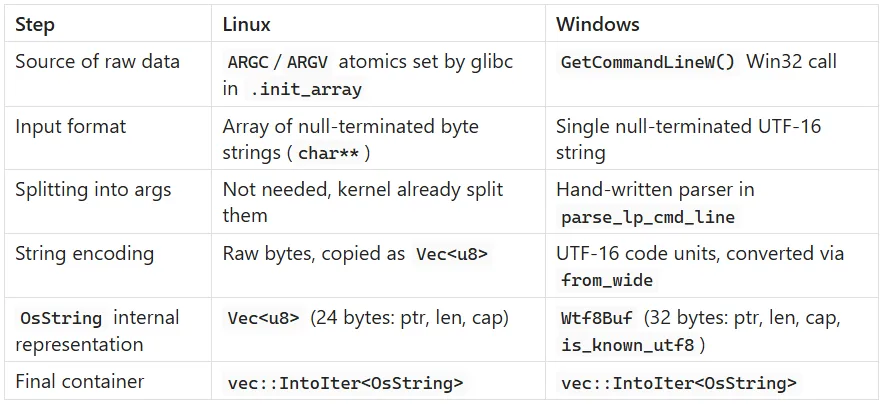
RE implication
The final Args struct on both platforms is identically vec::IntoIter
References
Check Point Research (2023) Rust Binary Analysis Feature by Feature. Available at: https://research.checkpoint.com/2023/rust-binary-analysis-feature-by-feature/
Check Point Research (2024) Inside Akira Ransomware’s Rust Experiment. Available at: https://research.checkpoint.com/2024/inside-akira-ransomwares-rust-experiment/
Cisco Talos (2024) Akira Ransomware Continues to Evolve. Available at: https://blog.talosintelligence.com/akira-ransomware-continues-to-evolve/
console-rs (no date) indicatif. Available at: https://github.com/console-rs/indicatif/blob/0c037edc86449d84aa457d7d5db80b4166c18d6b/examples/yarnish.rs.
ksk001100 (no date) seahorse. Available at: https://github.com/ksk001100/seahorse
Rust Project (no date) std::vec::IntoIter source. Available at: https://doc.rust-lang.org/src/alloc/vec/into_iter.rs.html#45-48
Rust Project (no date) sys/pal/unix/args.rs. Available at:https://github.com/rust-lang/rust/blob/79e9716c980570bfd1f666e3b16ac583f0168962/library/std/src/sys/unix/args.rs
Sapin, S. (no date) WTF-8: A superset of UTF-8. Available at: https://simonsapin.github.io/wtf-8/
Wikipedia (no date) cgroups. Available at: https://en.wikipedia.org/wiki/Cgroups
Vector 35 (no date) Signature libraries. Binary Ninja. Available at: https://binary.ninja/2020/03/11/signature-libraries.html
Microsoft Security (no date) Unveiling RIFT: Enhancing Rust malware analysis through pattern matching. Microsoft Security Blog. Available at: https://www.microsoft.com/en-us/security/blog/2025/06/27/unveiling-rift-enhancing-rust-malware-analysis-through-pattern-matching/
Vector 35 (no date) binaryninja.demangle — Binary Ninja API documentation. Binary Ninja. Available at: https://api.binary.ninja/_modules/binaryninja/demangle.html
Vector 35 (no date) binaryninja::demangle — Binary Ninja Rust API. Binary Ninja. Available at: https://rust.binary.ninja/binaryninja/demangle/index.html